Features / Reporting
Warehouse reporting, from headline to detail.
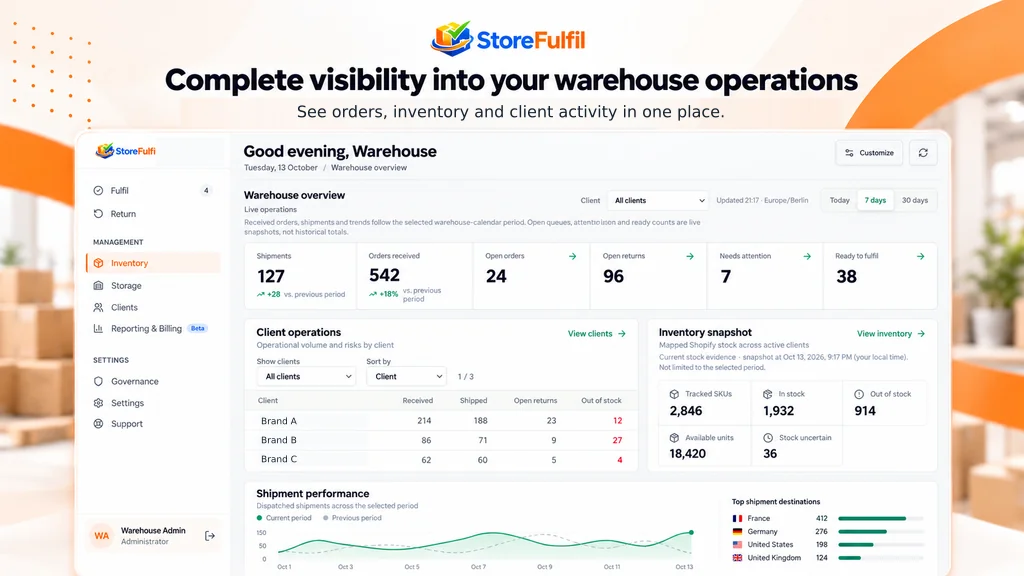
Get a clear view of work, stock, returns, client activity and dispatch through one reporting environment, with operational detail behind the headline numbers.
Visibility
Connect headline activity to actual orders, products and clients.
Managers can drill from totals to the individual activities behind them, without mixing operational reporting with every client's commercial rates.
Role-aware visibility exposes the relevant reports to warehouse operators and brand users according to their access.
- Warehouse overview dashboard
- Client operations view
- Inventory health snapshots
- Branded PDF usage reports
Workflow
From dashboard to detail
Start at the overview
See received, open, ready and shipped work and returns.
Filter the scope
Apply client, date and operational filters.
Drill into detail
Explain totals with SKU and order-level activity.
Share a report
Produce a client-facing PDF with warehouse branding.
Capabilities
Reporting capabilities
Dashboards, usage reports and role-aware access.
Overview dashboard
Current operational work and selected performance insights.
Customisable presentation
Adapt supported dashboard views to operational needs.
Order and dispatch visibility
Track work through received, open, ready and shipped states.
Returns visibility
Open and in-progress returns alongside completed work.
Inventory health
Tracked products, available units and availability categories.
Client operations view
Compare supported activity across brands within the right scope.
Periods and filters
Use supported client, date and operational filters.
Usage reports
Summarise fulfilment, item and returns receipt activity.
SKU and order detail
Explain the activities behind report totals.
PDF usage reporting
Client-facing reports with warehouse branding.
Role-aware visibility
Reports exposed according to operator and brand access.
Exports
Export order work as CSV and inventory as CSV or PDF for approved handoffs.
Buyer questions
What buyers ask about this
Can brand clients see reports?
Role-aware visibility exposes relevant reports to brand users according to their access.
Can reports carry my branding?
Client-facing PDF usage reports use warehouse branding.
Can I see what sits behind a total?
Yes. SKU- and order-level detail explains the individual activities behind totals.
Are commercial rates shown in operational reports?
Operational reporting is kept separate from every client's commercial rates, which live in billing.
Related features
Keep exploring
Automated 3PL billing
Rate cards, billing previews and invoice PDFs by client.
Order management
Ready, Processing, Waiting and Needs Attention queues with ownership.
Returns receiving and QC
Identify parcels, inspect units and restock eligible goods.
Warehouse inventory
On hand, available and committed stock with controlled corrections.
See the dashboards your managers would use.
Tell us about your clients, channels and warehouse workflow. We will show the relevant workflow and scope any sales channel or carrier integration with you.
Book a Demo