Features / Stocktakes and locations
Know what you have, and where to pick it.
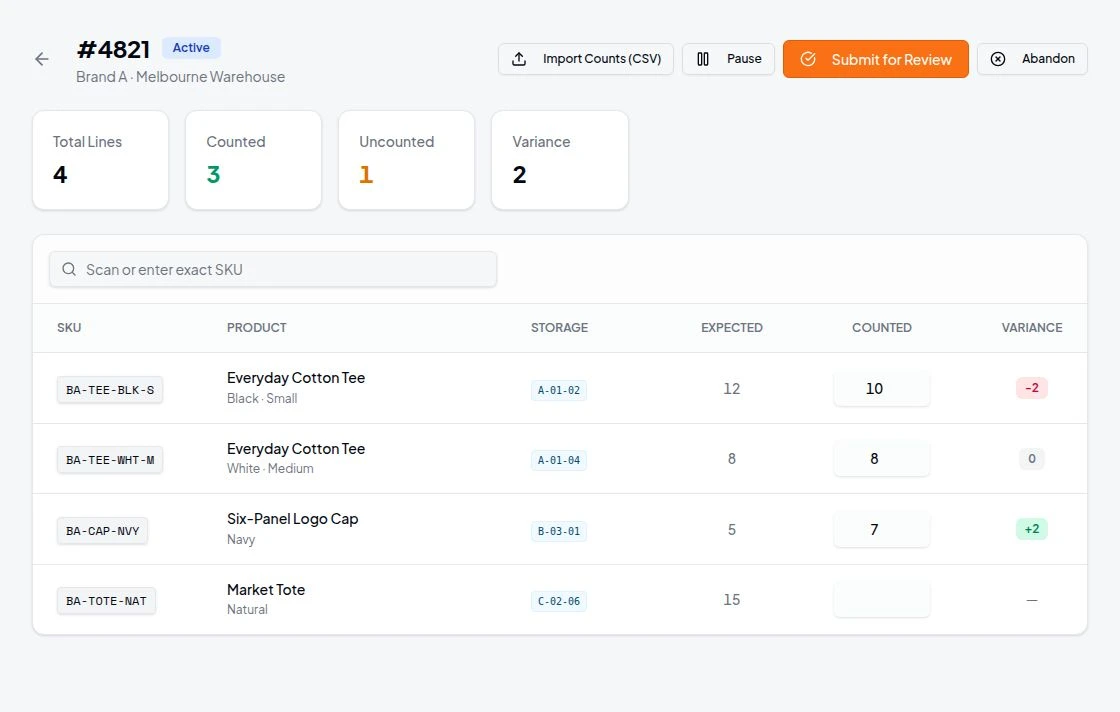
Bring physical warehouse structure and stock counting into the daily system. Organise internal locations, assign picking positions and run controlled stocktakes against a defined client stock scope.
Counting in context
Stock accuracy depends on the shelf as well as the record.
Location management and structured counts keep the physical warehouse and the digital record connected.
Start a session for a client scope, count, review the variances and complete, with corrections applied through the relevant inventory authority and recovery process.
- Storage hierarchy beneath the warehouse root
- Internal pick-bin assignment
- Client-scoped stocktake sessions
- Stocktake CSV import
Workflow
From layout to reconciled stock
Build the layout
Create areas, shelves and bins, or preview and validate a bulk import before committing.
Assign pick bins
Associate inventory with a practical retrieval location.
Count a client scope
Start, resume and count a session, including spreadsheet-assisted counting.
Review and reconcile
Complete reviewed corrections with retained history.
Capabilities
Location and stocktake capabilities
Layout, counts and reviewed reconciliation.
Storage hierarchy
Represent warehouse areas and shelf or bin locations beneath the warehouse root.
Create and edit locations
Build the layout staff use to find goods.
Archive and restore
Keep storage structures maintainable with retained history.
Bulk location setup
Preview and validate supported storage imports before committing changes.
Pick-bin assignment
Associate inventory with a practical warehouse retrieval location.
Client-scoped sessions
Start, count, review and complete defined stocktake work.
Bulk stocktake initiation
Create sessions for eligible client scopes.
Resume open counts
Return to in-progress counting rather than restarting.
Stocktake CSV import
Use approved spreadsheet-assisted counting within the workflow.
Reviewed reconciliation
Complete corrections through the relevant inventory authority and recovery process.
Buyer questions
What buyers ask about this
Can I resume a stocktake?
Yes. Open counts can be resumed rather than restarted.
Can I import locations from a spreadsheet?
Yes. Supported storage imports are previewed and validated before changes are committed.
Do stocktakes change stock immediately?
Corrections are completed through a review step and the relevant inventory authority, with recovery for uncertain outcomes.
Can locations be retired?
Locations can be archived and restored, with history retained.
Related features
Keep exploring
Warehouse inventory
On hand, available and committed stock with controlled corrections.
Wave picking
Consolidated picking stops with scan confirmation and order-by-order packing.
Reporting
Dashboards and usage reports with order and SKU detail.
Barcode pick and pack
Verified quantities through picking and packing.
In the Library
Operating guides for this workflow
Completing stocktakes
Library how-to for a full physical count.
Storage locations and stations
Library guide to warehouse locations.
Stale inventory
Library troubleshooting for out-of-date stock.
Inventory management
Library guide to stock views and corrections.
Plan your location layout and counting routine with us.
Tell us about your clients, channels and warehouse workflow. We will show the relevant workflow and scope any sales channel or carrier integration with you.
Book a Demo